

In early January 2026, CES in Las Vegas showed up in force, with the latest connected smart home and sensor-packed consumer gadgets. The smart home gallery was buzzing with fresh kit from Eufy—think AI-powered doorbells that spot parcels before the postie does—Arlo’s ultra-crisp outdoor cams, IKEA’s affordable smart blinds that sync with your morning routine, Dreame’s self-cleaning vacuum-mops are made with advanced obstacle intelligence that avoids pets, toys, and furniture like pros, heavy-duty snow-thrower robots for residential use, and Govee’s mood-lighting strips that beat to your Spotify playlist, security cameras, wireless sensors, auto-adjustable thermostats and more have appeared in the anomalous month of January.
If you’re a UK homeowner looking at these latest household gadgets, they’re making everyday life easier this year. But here’s the catch: none of it works without stable broadband. Whether you are a gadget enthusiast or just someone who wants their heating to turn on before they get through the front door, understanding your “broadband speed” is essential.
Let’s talk about what your broadband speed and capacity needs to handle this task without causing a setback.
In 2026 Smart Technology Landscape:
It is a common panorama in Britain now: almost 40% of us have a smart meter, and over a third of us (35%) are chatting with voice assistants like Alexa or Google. But the trend is changing now. We are moving away from single gadgets toward “ecosystems.”
Think of the new IKEA sensors or Arlo’s latest 4K cameras. These aren’t just toys; they are part of a connected ecosystem. However, our research shows that while we love the convenience, one in three of us (33%) are terrified of what happens if the internet goes down. Nobody wants to be locked out of their own house because they are experiencing slow Wi-Fi at busy hours (unresponsive or dropping network).
Your smart home is only as clever as your broadband!
If you’ve ever watched your security camera buffer like it’s on dial-up, or your Nest thermostat suddenly goes offline when you’re trying to turn the heating on from the sofa, you know the pain. Britain’s homes are filling up with connected gadgets faster than ever. The average household now juggles around 16 smart devices – and one in ten has 30 or more. Yet too many of us are still running on broadband that simply can’t handle multiple devices at once.
Here’s exactly what you need to keep everything running smoothly.
Why is slowing Wi-Fi creating problems with smart home stuff?

Smart devices aren’t being lazy. They’re constantly syncing to the cloud server.
- A video doorbell uploads HD clips.
- Security cameras stream 24/7.
- Smart speakers listen for your next command.
- Even smart HVAC systems constantly check for firmware updates every minute.
When the connection stutters, the whole system feels stuffy or sluggish. Lights refuse to turn off. The smart front door lock is offline and refuses to unlock when the internet is not working. And that expensive camera system you bought for home security suddenly has no control over its operation.
We’ve heard it from readers up and down the country. One bloke in Bristol told me his 4K cameras turned his living room into a slideshow every evening. Another in Glasgow missed three Amazon deliveries in a fortnight because the doorbell kept dropping out. These aren’t rare gripes. They’re the new normal when broadband is not as reliable as it used to be.
What Does Your Home Actually Need?
If your cousin or family member living in Manchester has installed six new 4K Arlo security cameras or Govee smart home lighting. The very next day, her Netflix started buffering, and her smart doorbell took ten seconds to show who was at the door. Why is her home Wi-Fi network down all the time? Beacuse she doesn’t have consistent broadband speed, and the bandwidth capacity often makes them slower.
Understanding Smart Home Broadband Speed Requirements!
Your smart home only works as well as the broadband behind it. Stable user experience is commonly craved for network reliability to avoid frequent drops, network congestion, and latency issues in high-traffic hours—especially in 2026 when that new Eufy doorbell or Arlo camera is streaming 24/7.
Most UK households now average 285 Mbps (up from 223 Mbps in 2024, according to Ofcom’s Connected Nations 2025 report). That’s plenty for even ambitious setups. Yet raw speed isn’t everything. You also need stable upload, low latency, and smart bandwidth management so your lights don’t fight your security cameras for attention.
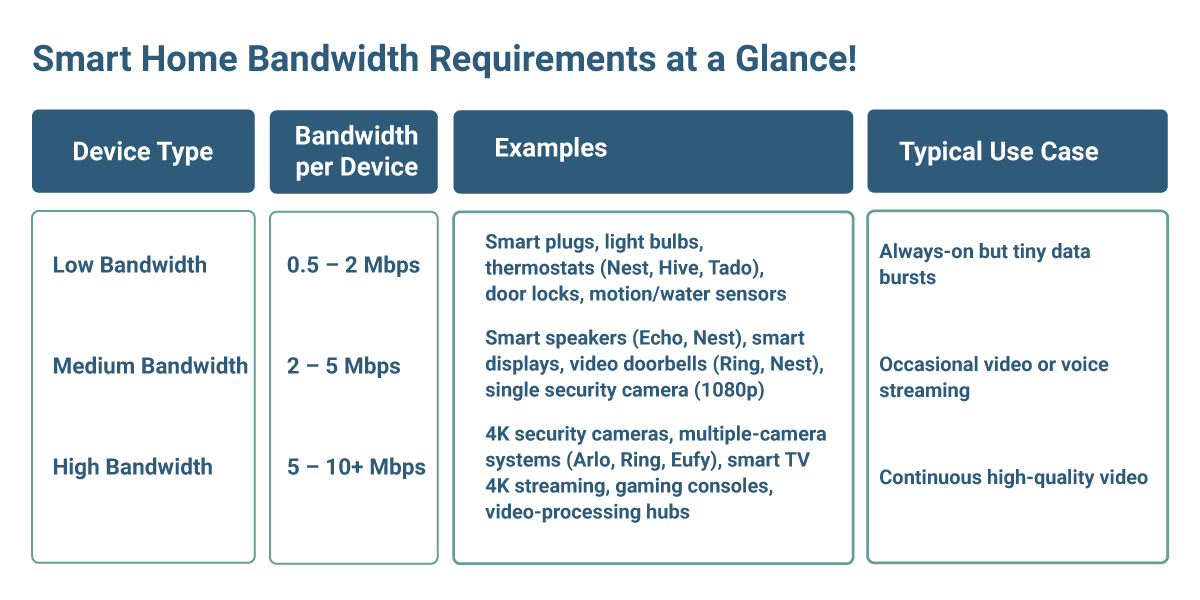
Here’s a clear breakdown of what different devices actually use and what connection you really need.
Smart Home Bandwidth Requirements at a Glance!
Baseline Speed Recommendations for UK Homes!
In 2026, we categorise requirements into three “types” of your wireless communication:
- The Low-Speed (0.5–2 Mbps): These are your “set and forget” items. Connected devices—including smart plugs, light bulbs, and smart thermostats like Honeywell or Nest- typically require low bandwidth. A stable 2.4GHz connection operates primarily on Wi-Fi to reach through walls.
- The Middle Speed (2–5 Mbps): This is where your smart speakers and video doorbells live. They gobble up bandwidth to support connected gadgets and stream audio or HD video without stuttering.
- The Fast Speed (10+ Mbps per device): If you’ve treated yourself to the latest 4K cameras from Eufy or Dreame’s high-end hubs, you’re pushing a lot of data. Multiple cameras can easily gobble up 50 Mbps of your bandwidth on their own.
The Golden Rule for 2026:
For a standard UK household, a fibre broadband package should be considered.
- Basic speeds (5–10 devices, mostly lights & thermostats) Minimum: 40/10 Mbps fibre broadband package is probably fine.
- Typical family setup (10–20 devices with 1–2 cameras) Recommended: 100–150 Mbps fibre broadband plans.
- Advanced setup (20+ devices, multiple 4K cameras, streaming) Optimal: 150–300+ Mbps for zero buffering and future-proofing.
- “Power User” (50+ devices, it requires enough bandwidth) Ideal: At least 500 Mbps or even Gigabit (1,000 Mbps) fibre broadband deals to ensure large capacity for smart home gadgets for future-proof connectivity and always-on network reliability.
3 Quick Tips for Broadband Speeds
- Check Your Router: If you’re still using the free router your provider gave you in 2022, it’s time for an upgrade. Look for Wi-Fi 6 or 6E for faster wireless speeds, higher network capacity, and lower latencies—these are designed to handle 50+ devices at once, without creating any network congestion.
- Split Your Bands: Keep your “heavy” devices (TVs, Cameras) on the 5GHz band and your “light” ones (Bulbs, Plugs) on the 2.4GHz band. It’s like giving the lorries and the sports cars their own lanes.
- Consider Mesh Router: If you live in a traditional British brick home, thick walls and large obstructions block and weaken your Wi-Fi signal. A mesh system (like Eero or TP-Link) ensures your back-garden camera stays connected.
(Full Fibre) FTTP – is your backbone for smart home requirements!
The magic word is FTTP – Fibre to the Premises, when an optical fibre cable connects directly to your premises. It replaces old copper wires with glass threads that carry light instead of electricity. No more interference from your neighbour’s microwave or the baby monitor.
With full fibre home broadband connection, your doorbell responds in real time. Smart cameras record crisp 4K footage even when the kids are streaming Peppa Pig in 4K in the room. And the whole Internet of Things (IoT) – that posh term for all your gadgets talking to each other – just works.
If you’re still using an old copper cable broadband connection that hasn’t been upgraded, you soon get a notice of the difference the moment you switch to a fibre broadband package. It’s like going from a Ford Fiesta to a Tesla – same roads, completely different drive.
Simple steps to stop the buffering nightmare!
You don’t need to rewire the whole house. Start here:
- Check your current speed on a proper test (try the Ofcom-approved one at co.uk/speedtest).
- Move your router out of the cupboard and away from the microwave.
- Split your Wi-Fi: put older gadgets on the 2.4GHz band and newer ones on 5GHz (or 6GHz if your router supports it).
- Add a mesh system like Google Nest Wi-Fi 6E if you live in a bigger house or have thick concrete walls.
- Choose a router that supports the latest standards – Wi-Fi 6 or 6E handles dozens of devices without breaking a sweat.
Many providers now bundle decent mesh routers with their broadband package. It’s worth asking.
The future is already knocking!
Smart homes are no longer a posh London thing. From smart heating that knows when you’ll be home from the commute to lights that dim automatically at tea time, connected living is becoming everyday British life.
But none of it works properly without reliable broadband. Your smart home is only as intelligent as the connection powering it.
So go on – take two minutes right now. Run a speed test. See what you’re actually getting. If it’s under 100 Mbps or your Wi-Fi feels patchy, it might be time for an upgrade.
Are Your Home Smart Devices Ready for 2026?
Investing in smart tech is exciting, but don’t let a “digital traffic jam” ruin the experience. Before you buy that next fancy robot vacuum or AI-powered security kit, take a moment to see if your broadband package can handle the extra demand.
Ready to see how your current setup stacks up? Explore our 2026 home broadband packages to ensure your next upgrade is a smooth one.